WooCommerce Integration
Run your catalog from Indexed PIM and keep WooCommerce aligned with background sync for products, categories, attributes, stock, and customer data, plus built-in order import back into your PIM.
What the WooCommerce integration actually covers
This integration is more than a basic product push. The WooCommerce app connects Indexed PIM to one or more WooCommerce stores and supports both queued batch jobs and event-driven sync when data changes inside the platform.
In practice, that means your team can upload and download categories, attributes, attribute terms, and products, keep stock synchronized, sync customer records out to WooCommerce, and pull recent WooCommerce orders back into Indexed PIM for downstream handling.
The sync logic is app-aware. It respects the store language, configured currency, product channel assignment, and product status, so each WooCommerce app can publish the right version of the catalog without leaking data from the wrong market or channel.
Included out of the box
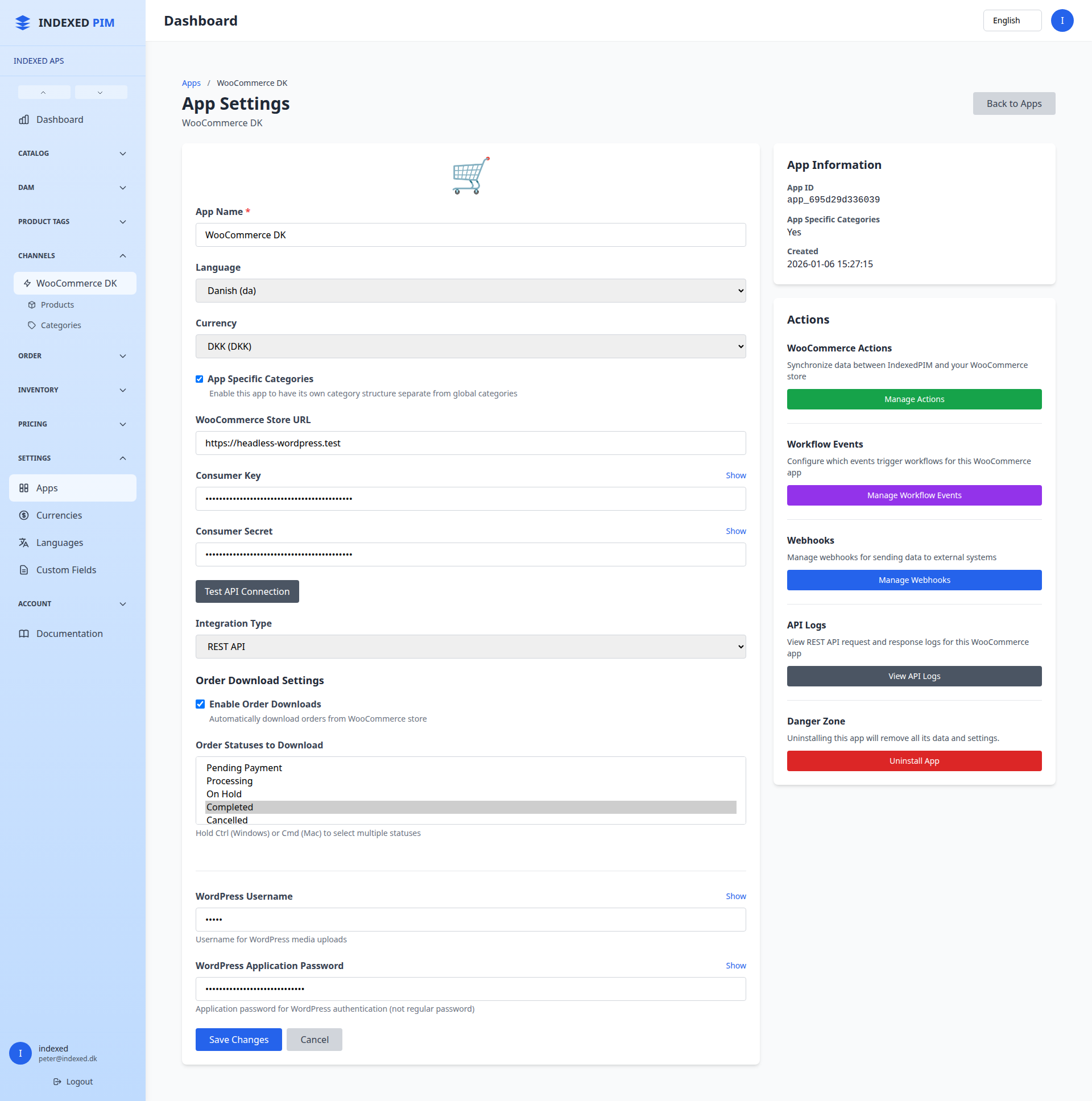
Connection test with store URL, consumer key, and consumer secret
Manual upload and download actions with queue status and stop control
Automatic sync on product, category, property, inventory, and customer changes
API logging for requests, responses, failures, and response times
Scheduled campaign price updates for WooCommerce products
Core features included in the app
The landing page below reflects the behavior implemented in the WooCommerce module, not a generic integration checklist.
Catalog Upload and Download
Queue imports or exports for categories, attributes, attribute terms, and products. Long-running jobs report progress and can be stopped from the app actions screen.
Simple, Parent, and Variant Products
The sync handler supports simple products, configurable parent products, and WooCommerce variations. Parent products and variants are kept in sync together.
Attributes and Terms Mapping
Property groups are mapped to WooCommerce attributes and properties are mapped to attribute terms. Existing WooCommerce attributes can be discovered and linked instead of duplicated.
Inventory and Backorders
Stock is pushed with managed inventory, total quantity, and backorder handling. Active inventory rows are aggregated so WooCommerce reflects the current sellable quantity.
Orders Downloaded into PIM
Recent WooCommerce orders can be imported into Indexed PIM, including customer details, billing and shipping addresses, order date, currency, totals, and line items.
Background Jobs and API Logs
Sync work runs through the queue for reliability. Each API call can be logged with payloads, status, timing, and event context to make troubleshooting easier.
What gets synchronized
The product sync is field-aware and already handles the data merchants usually end up mapping by hand.
Product data
Channel controls
How the integration works in practice
Connect the store
The app stores the WooCommerce shop URL, API credentials, and optional WordPress credentials. A built-in connection test validates the REST API before you start syncing.
Choose batch sync or automatic sync
Teams can trigger manual upload and download jobs for catalog structures and products, while the event subscriber automatically dispatches sync jobs when products, categories, inventory, customers, properties, or property groups change.
Run through the queue with progress tracking
Large jobs are processed in the background. The WooCommerce actions UI exposes sync status, processed counts, completion state, and stop controls so the team can monitor imports and exports safely.
Keep commerce data auditable
API requests and responses are logged, external IDs are stored for mapped entities, and scheduled price sync can update WooCommerce sale pricing when campaign rules start or end.
Problems this integration solves
The app is built for teams that have outgrown manual WooCommerce maintenance.
Catalog changes are being repeated in multiple systems
Products, categories, and attributes can be maintained centrally and pushed out from Indexed PIM instead of being recreated by hand in WooCommerce.
Solution:
Use the WooCommerce app as the publishing layer for store-ready data.
Variant-heavy assortments are difficult to keep clean
The product sync knows the difference between parent products and variations and updates the related attribute structure needed by WooCommerce.
Solution:
Publish parent and variant products together rather than managing variations manually in the store.
Store content does not match the right language or currency
Multi-market setups break when teams publish the wrong text or prices to a store. This app filters translatable fields and price fields against the configured app locale and currency.
Solution:
Attach a WooCommerce app per store or market and publish only the relevant catalog slice.
Stock and orders are handled too late
Inventory changes can be pushed to WooCommerce, and recent WooCommerce orders can be downloaded into Indexed PIM together with customer and address data.
Solution:
Keep your commerce workflow anchored in PIM instead of relying on disconnected store admin routines.
Need a WooCommerce setup that can handle real catalog complexity?
Use Indexed PIM to control product data once, publish it cleanly to WooCommerce, and keep orders, stock, and catalog structures moving through one workflow.